


Through the confirmation gate: three outcomes
After each reply is sent, Gedo turns what you said in that turn into facts with their sources. Each one passes a confirmation gate and, by source, confidence and conflict, lands in one of the three places below.
When a conversation winds down, Gedo also rereads the whole thing to pick up anything it missed, and you can choose Review this conversation from the chat menu. Important things found this way go to To review by default.
To review is in the header of the Memory page, and its icon shows a dot when something is waiting. Skip only passes on an item for now; the same thing may come up again later.
Free keeps a set number of long-term memories; Pro and Ultra have no limit. Candidates waiting in To review don’t count.
| Outcome | What goes there | After that |
|---|---|---|
| Saved directly | Important facts it is sure about, such as where you live or what you do | Usable right away, marked Auto-saved, and you can undo it |
| Saved as unconfirmed | Ordinary facts | No prompt; when Gedo uses one, it notes that it is unconfirmed |
| Sent to To review | Corrections, values that conflict with an existing memory, and important things it isn’t sure about | Waits for you to accept or skip; corrections and conflicts never take effect on their own |
Unconfirmed and rarely used
Unconfirmed memories are already in your memory. The AI won’t bring them up on its own, and when it uses one it notes that it is unconfirmed. Connected AIs and your public avatar never read them.
Once an unconfirmed memory has been cited in an answer or mentioned again three times in total, it is confirmed automatically; choose Accept on it and it becomes You confirmed right away.
Rarely used holds memories you don’t need for now. Facts about how things are lately become rarely used after 30 days, and candidates left in To review expire (14 days for those from chats, 90 days for imports) and become rarely used instead of disappearing. Rarely used memories are only looked up when you are searching for something.
Neither kind appears in the main timeline list by default. Use the Unconfirmed & rarely used filter in Memory › Memories to accept or delete them one by one.
Memories: one timeline
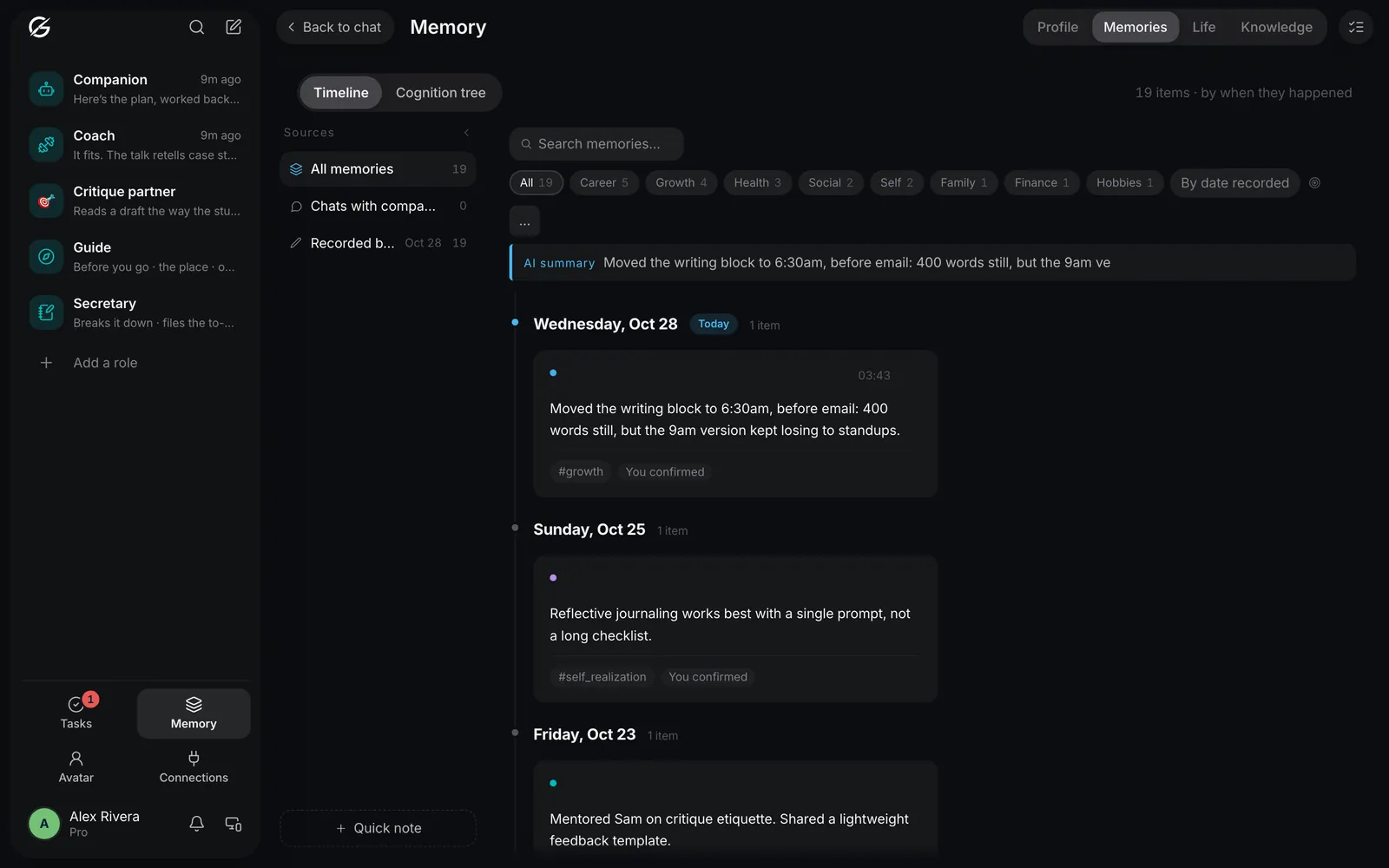
Memory › Memories › Timeline lays out all your memories by when they happened, and you can switch to when they were recorded. Every memory has both times: backfilling something from three years ago is normal, and when it happened was never the same as when it was recorded.
If the date is wrong, choose Change time: pick a year, month, day, quarter, decade or a fuzzy period such as “college years”, and check About if you aren’t sure. Left blank, it files under the time it was recorded; an explicit year or month in the text is picked up automatically.
Life events like moving, a new job or graduating appear on the timeline as cards with a category, a place and where you were based, at two levels: milestone and marker. You can change the level or choose Not a life event, and Life events only leaves just these on the timeline.
To add one yourself, use Add › Quick note on the web or the + at the bottom right of the Memory page in the app. What you write yourself is marked You said and saved directly.
Sources, history and what Gedo changed
Every memory shows how it came in: “You said”, “You confirmed”, “Auto-saved”, “AI’s idea, you agreed”, “Unconfirmed” or “Imported”. Where this came from shows the original wording, and Show history lists when it was saved, who changed it and what replaced it, with Restore this version.
Changed by Gedo, under More actions at the top right of the timeline, lists every change to your memories and profile in the last 30 days that you didn’t start, with an undo wherever one is possible.
Each night Gedo looks for near duplicates (to merge) and memories not recalled in a long time and never confirmed (to stop bringing up), and puts them in To review under From nightly organizing. Nothing changes until you accept, and you can undo after.
When you say “do it like this from now on”, or correct the same thing more than once, Gedo suggests a how-to for you to confirm, and once accepted it follows it whenever the topic comes up. These live in the How you want things done card in Memory › Profile, where you can see what you said and delete them.
What never becomes memory
Drafts from work in progress, text written for you, generated checklists and card contents are not stored: what the AI writes itself doesn’t count as evidence about you. From the AI’s replies, only a plan, arrangement or rule you clearly agreed to at the time is kept, marked “AI’s idea, you agreed”, and you can undo it; suggestions you didn’t take up and general knowledge are not.
ID numbers, passport numbers, bank card and account numbers, and passwords stay out of memory: before anything is written to memory or to the original text of past chats, they are replaced with a placeholder, and the message you sent stays as it was. When a message looks like it contains one, Gedo asks before sending whether to save it to your safe instead; see Safe.
Pause, exclude, delete or forget
- Pause long-term memory: turn it on in Settings › Privacy. While it is paused, chats neither read nor write memory and connected AIs can’t read or write it; imports still produce candidates, but nothing is accepted automatically.
- Don’t let AI mention: choose it from a memory’s More menu. Search, the original text of past chats, connected AIs and your avatar stop using it, you still see it, and Visible to AI again brings it back; to see it less without excluding it, choose Mention less.
- Delete: you have 30 seconds to undo, after which it is deleted along with its older versions. Check Don’t remember this again and the same content isn’t recorded automatically again (only a fingerprint is kept, not the text), though you can still write it down yourself; the list is in Settings › Memory export, where each entry has Stop forgetting.
- Say “forget” in chat: for example, “forget what I said about the move last time”. Gedo shows a receipt with how many memories were forgotten; the AI won’t bring them up or record them automatically again. You can undo for 10 minutes, and after that they are deleted.
- Temporary chat: in a new chat on the web or the Mac app, tap Temporary in the composer, and that chat neither reads nor writes your long-term memory.