


AI services
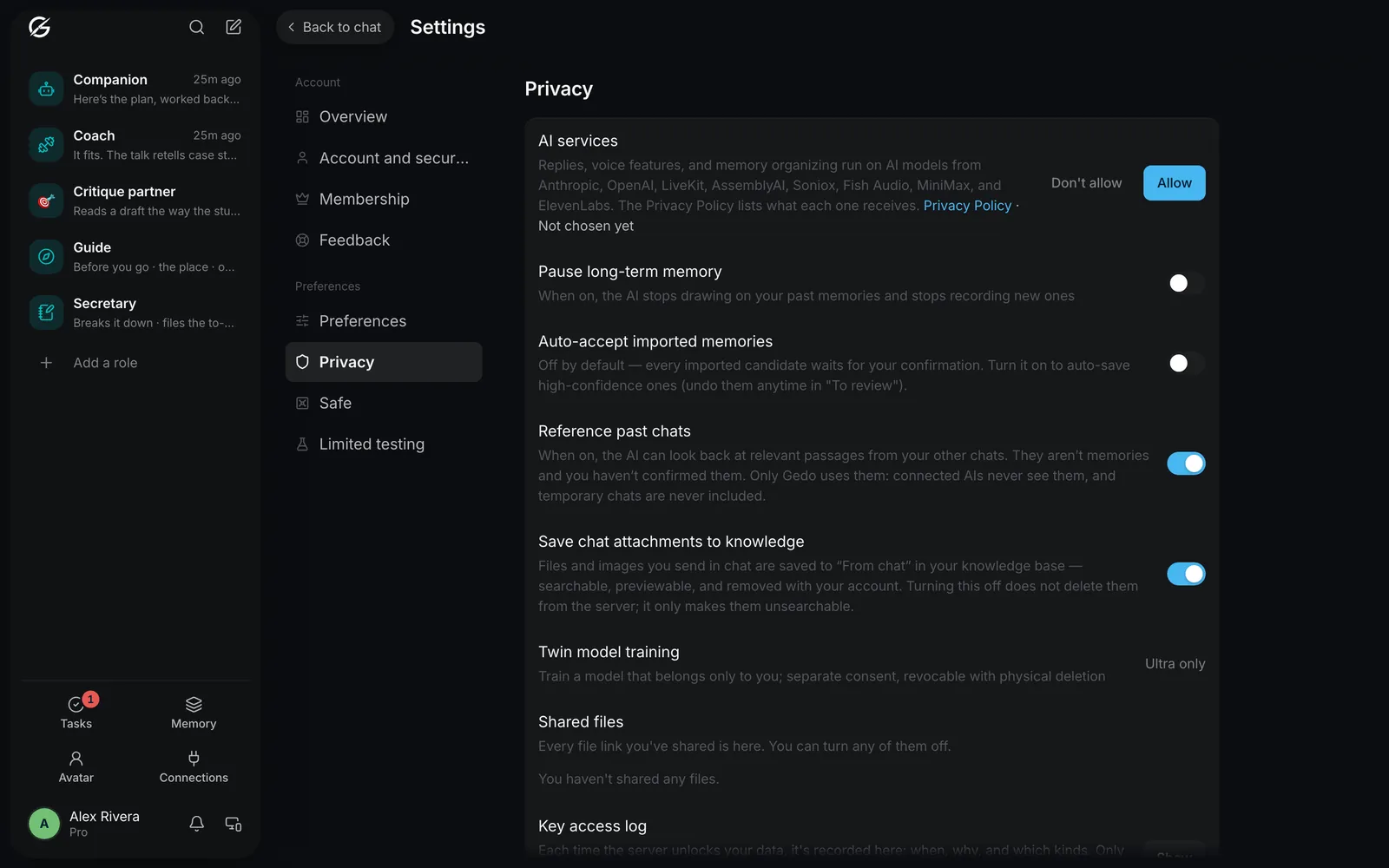
The first row in Settings › Privacy is “AI services.” Replies, voice features and memory organizing run on AI models from Anthropic, OpenAI, LiveKit, AssemblyAI, Soniox, Fish Audio, MiniMax and ElevenLabs; the Privacy Policy lists what each one receives.
Turn it off and Gedo stops sending your data to these providers; replies, voice transcription, calls and memory organizing stop until you allow them again.
Pausing memory and temporary chats
While “Pause long-term memory” is on, Gedo won’t use past memories or save new ones, and the recall line in a chat says nothing was looked up. Connected AIs can’t write memories either, and whole conversations they send are not accepted.
To keep a single chat out of memory, start a temporary chat: it neither reads nor writes your long-term memory.
Single memories
Choose “Don’t let AI mention” in a memory’s menu: no search brings it up, connected AIs can’t read it, and it’s left out when you export your memory passport. The record stays with you, and “Visible to AI again” brings it back.
Choose “Don’t remember this again” and only a fingerprint of it is kept, so it’s held back automatically if it comes up again. The list is in Settings › Memory export.
Other switches
These are in Settings › Privacy as well.
| Switch | Default | What it does |
|---|---|---|
| Reference past chats | On | Draws on relevant lines from your other chats; only Gedo uses them, connected AIs never see them, and temporary chats don’t use them |
| Auto-accept imported memories | Off | High-confidence imports are saved right away, and you can undo them in To review |
| Save chat attachments to knowledge | On | Files you send in chat go to your knowledge base so you can find them; turning it off keeps the files but makes them unsearchable |
| Mark to-dos done automatically | On | Checks off to-dos it can tell are done, and you can undo; when off, it asks first |
| Shared files | — | Lists the file links you’ve shared; “Stop sharing” on one and its link stops working right away |
| Key access log | — | An entry each time the server unlocks your data; see Key access log |
Training consent
By default nothing you write trains any model. The one exception is the Twin model, which takes a separate consent from you in Settings › Twin model; its training runs on open-source models Gedo operates itself, with neither the training data nor the trained model handed to any third-party AI service. What is sent with a drafting request stays within the same scope as your everyday chats.
Consent can be withdrawn at any time. On withdrawal, the training material and the model trained from it are physically deleted. The Twin model is rolled out to a list in batches, and subscribing doesn’t put you on the list; see The Twin model.
Where your data lives and how to take it with you
Data is stored per account on cloud servers, and every transfer is encrypted over HTTPS. Your content is stored as ciphertext with five keys per person separated by layer, and every unlock is recorded in a key access log you can see; see How your data is encrypted and who holds the keys and the security page.
Export is in Settings › Memory export: “Export memory passport” gives you one .gmp file, or you can export one Markdown file per memory. “Erase all my data” is at the bottom of Settings › Privacy and asks you to confirm; for what gets deleted and how backups are handled, see Export, migration, and deletion.